What is NZ About Us Privacy Download
Personal Finance App

NeverZero: Personal budget app

Track expenses, organize your money by category, and save automatically with rollover. NeverZero helps you plan ahead instead of only looking back.

NeverZero dashboard showing budget categories and available money

Not just expense tracking.
Real planning for real life.

Most finance apps only show what already happened. NeverZero helps you plan upcoming bills, assign money with intention, and keep leftover funds rolling forward.

The problem

Many people know how much they spent, but not how much they can still spend safely. That creates stress, overdrafts, and surprise bills.

The solution

NeverZero organizes your money by categories, shows what is left in each one, and makes every dollar easier to understand.

The difference

With rollover, money you do not use this month can stay available for the next one. That turns unused budget into intentional savings.

See how NeverZero helps you
track, plan, and save.

From your dashboard to category planning and transaction assignment, NeverZero gives you clarity at every step.

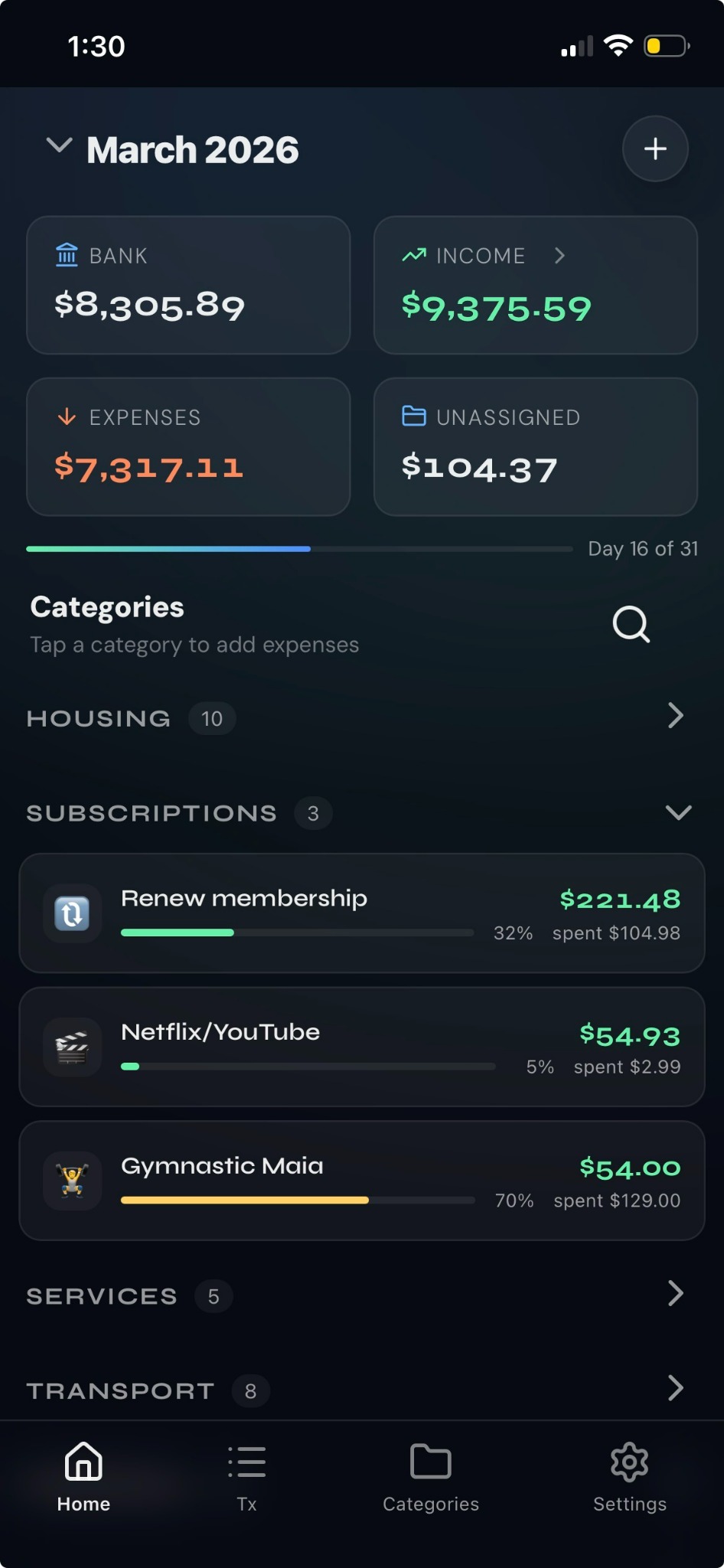
NeverZero dashboard with monthly budget summary and categories

Control total of your money

See bank balance, income, expenses, and unassigned money in one place.
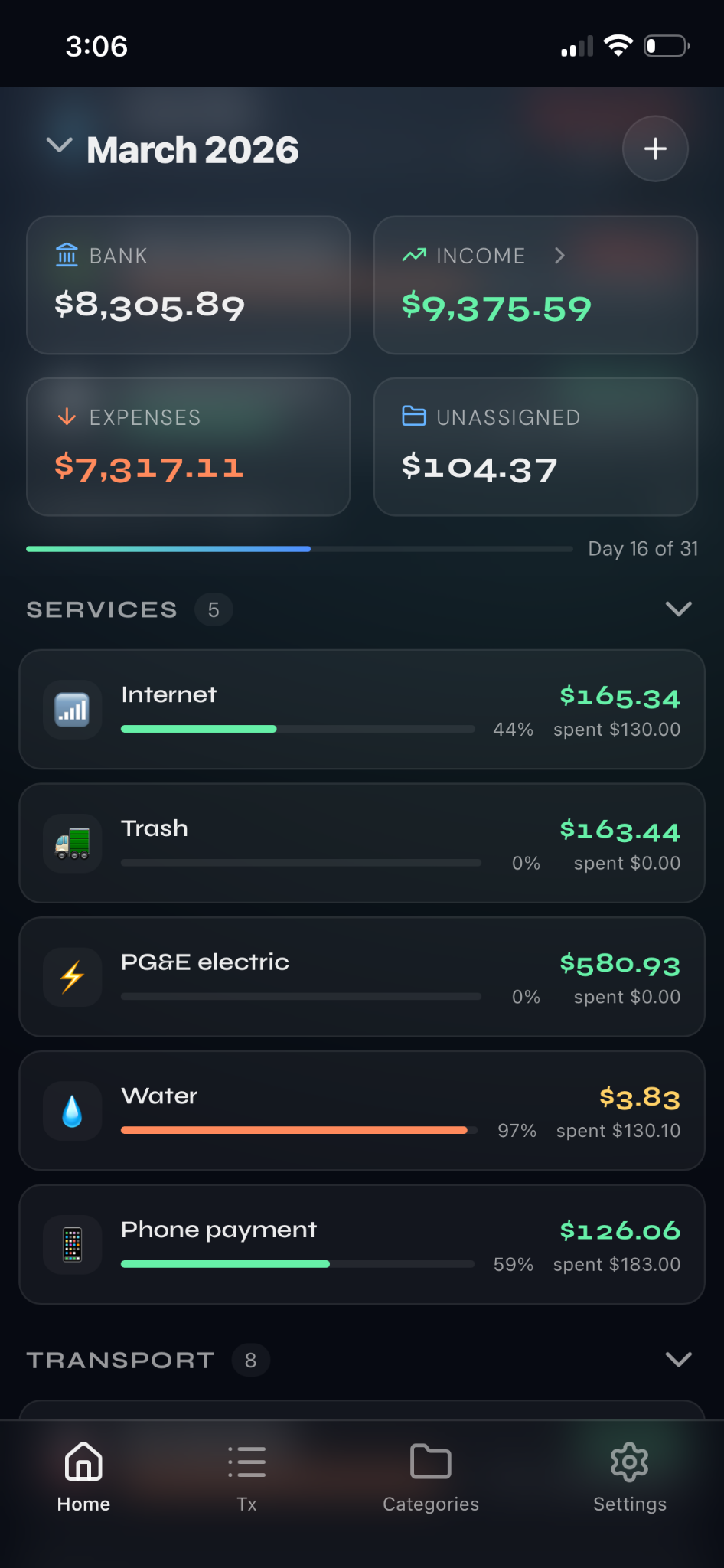
NeverZero category overview with available budget by category

Organize every dollar by category

Housing, subscriptions, transport, and more โ€” each category shows what is left.

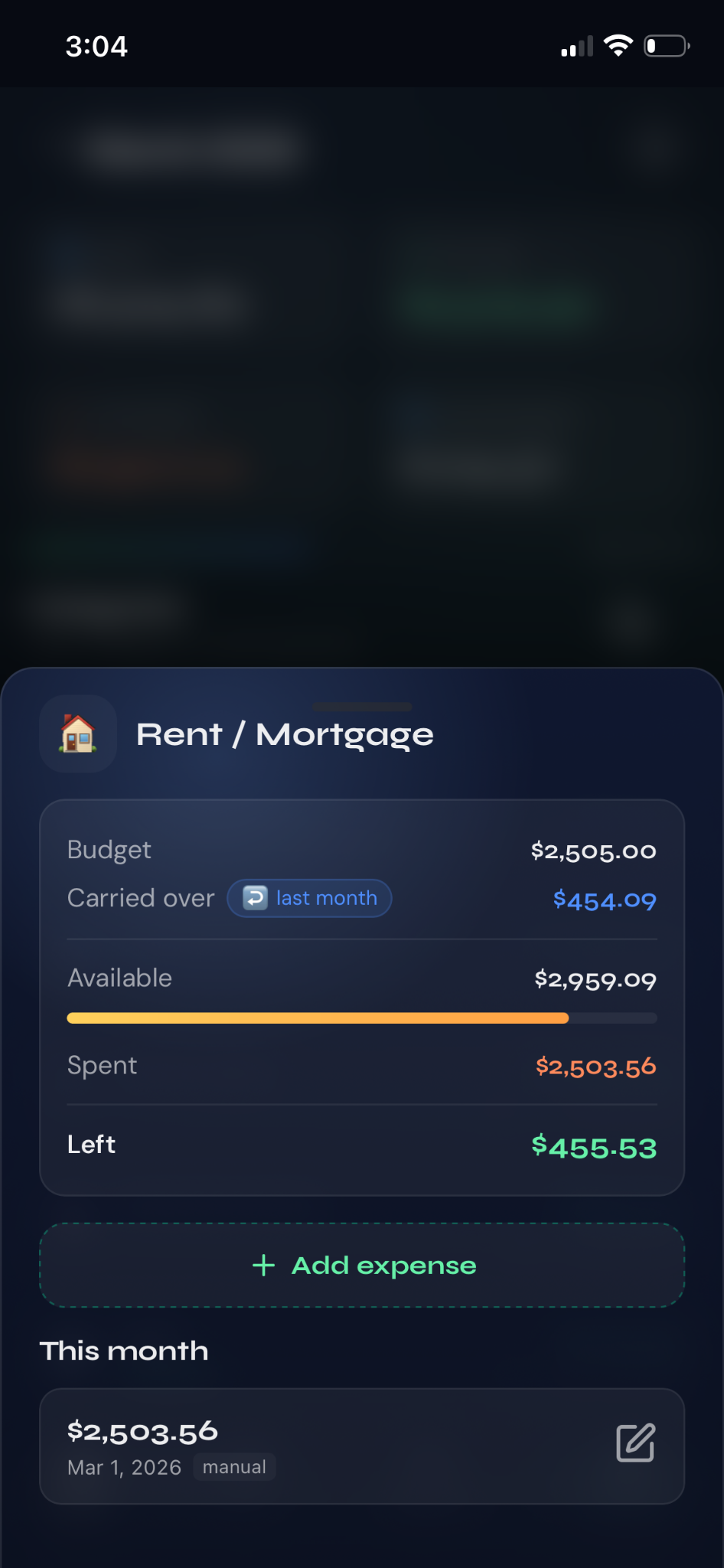
NeverZero category detail modal showing budget available spent and rollover amount

Know exactly what you can spend

Available, spent, and rollover amounts are clear before you add the next expense.
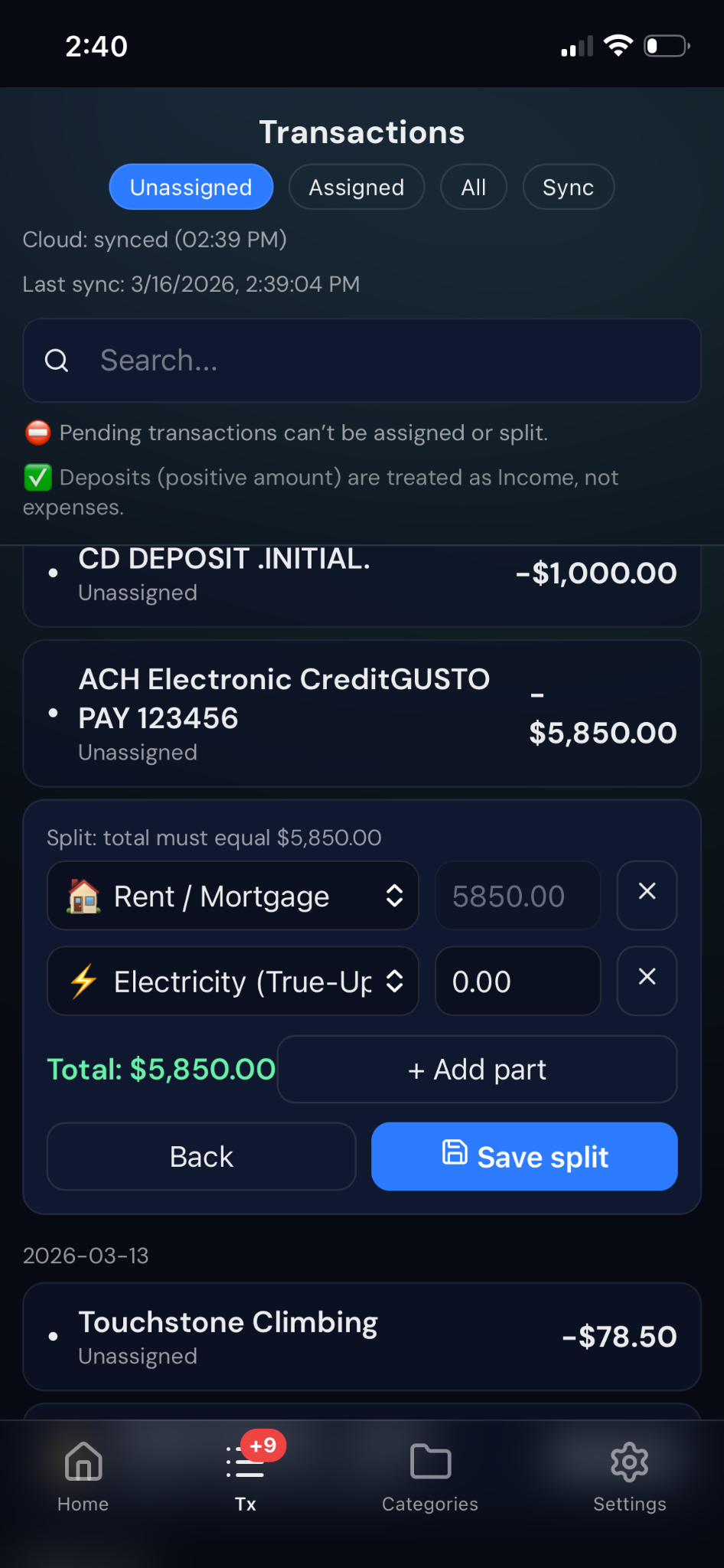
NeverZero transaction split screen assigning one transaction across multiple categories

Split and assign transactions fast

Turn imported transactions into a clean plan by assigning or splitting them into categories.
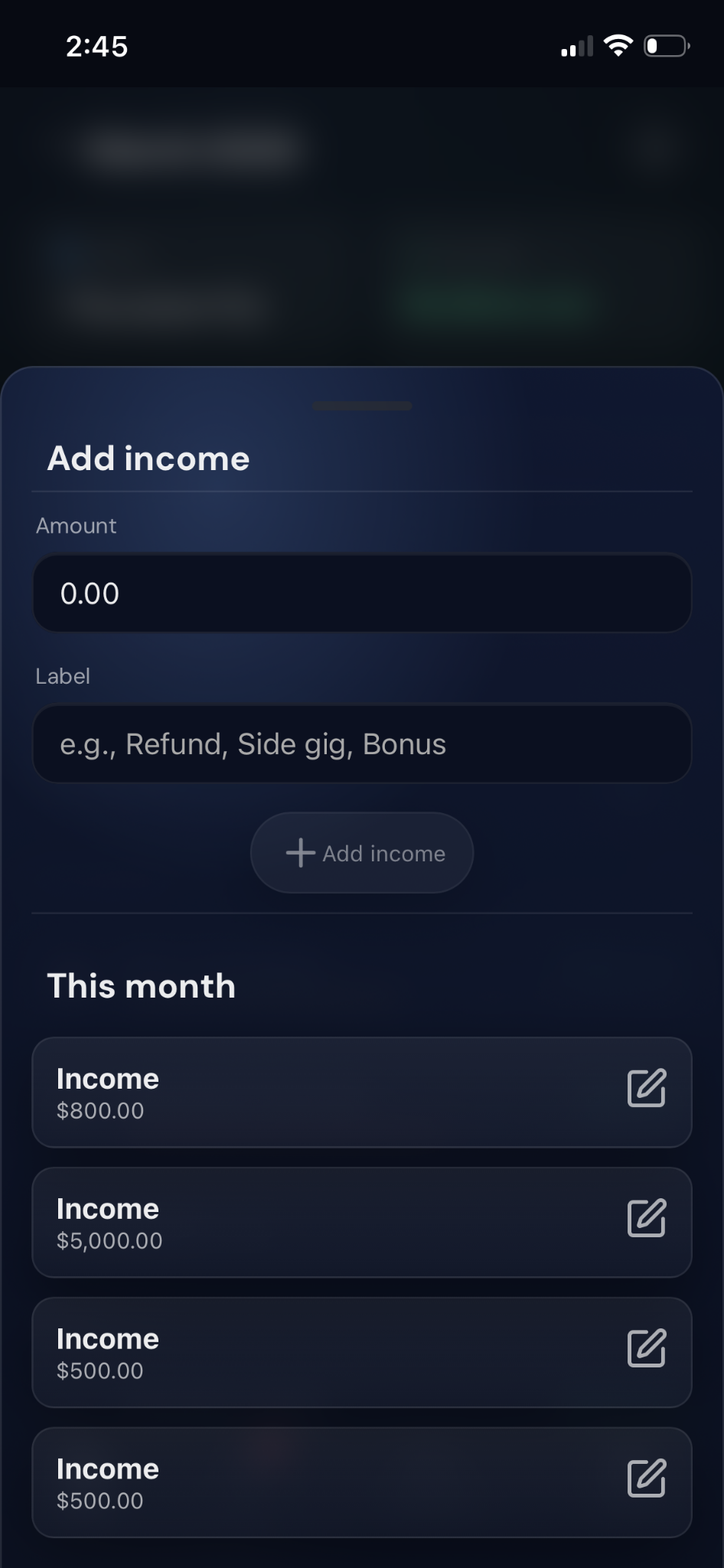
NeverZero add income sheet for manual income entries

Add income in seconds

Start with real numbers so your monthly plan is always grounded in what you actually have.
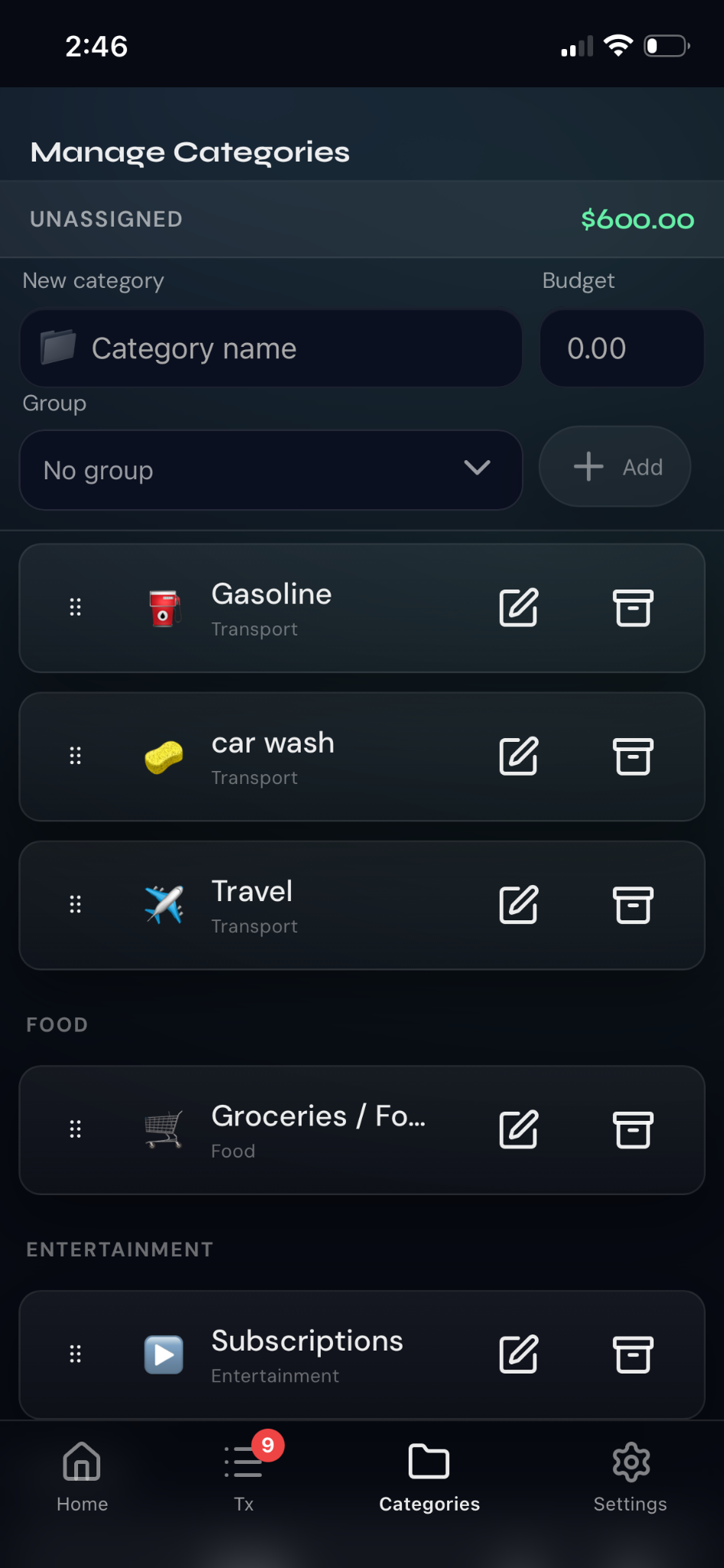
NeverZero manage categories screen for creating and editing budget categories

Build a system that fits your life

Create your own categories and groups for bills, goals, subscriptions, travel, and more.

Your financial ally
in your pocket.

NZ was built with a simple mission: help anyone understand where their money goes and make better financial decisions.

NZ connects to your bank via Plaid, a certified and secure platform, to bring your transactions directly into the app. You decide how to organize every expense.

With the Roll Over method, the money you didn't spend this month automatically rolls into your savings goals. Zero extra effort.

You can start without an account in guest mode, or sign in with Google to sync your data across devices and never lose anything.

๐Ÿฆ
Real bank connection
Connect your bank securely with Plaid. Your passwords never pass through NZ.
๐Ÿ—‚๏ธ
Custom categories
Create your own categories and assign each transaction however you like.
๐Ÿ”„
Roll Over method
What you don't spend automatically becomes savings the next month.
๐Ÿ”’
Full data control
Delete all your data with one button. Disconnect your bank whenever you want.

A team that believes in
financial education.

We're a small team with a big idea: nobody should need an accountant to understand their own money.

N
Founder / CEO
Product & Vision
The person behind NZ. With experience in personal finance and product development, founded NZ to solve a problem they lived themselves: not knowing where the money was going.
D
Engineering
Development & App
Responsible for making NZ run smoothly, securely, and fast. Passionate about building experiences that feel natural from the very first use.
D
Design
UX & Visual Design
Turns complex ideas into simple, intuitive interfaces. Believes a good finance app should feel like a conversation, not a report.
"We believe that understanding your finances shouldn't be complicated. NZ exists so that everyone has clarity about their money, regardless of their financial background."

Your information,
under your control.

We don't sell data. We don't share it. You decide what to keep and when to delete.

๐Ÿฆ Bank Connection

We use Plaid to connect to your bank. NZ never sees or stores your banking passwords. Authentication happens directly in a secure Plaid window. We only receive your transactions and current balance.

๐Ÿ’พ Data We Store

Guest mode: everything is saved locally on your device. NZ cannot access that data.

With Google: your categories and assignments sync to the cloud using your user ID.

๐Ÿค Who We Share With

NZ does not sell or share your information with anyone. The only external services are:

  • Plaid โ€“ bank connection
  • Google โ€“ account authentication

โœ… Your Rights

  • Delete all your data from the app
  • Disconnect your bank at any time
  • No banking data on our servers
  • Full control at all times
Effective date: February 23, 2026. For privacy questions contact us at inf@neverzeroapp.com

Available wherever
you are.

iOS, Android and Windows. One seamless experience across all your devices.

iOS
App Store
Download on App Store
Requires iOS 15.0 or later. Compatible with iPhone and iPad.
Android
Google Play
Download on Google Play
Requires Android 8.0 or later.
Windows
Progressive Web App (PWA)
Download on Microsoft Store
๐Ÿ’ก
What is a PWA for Windows?
A Progressive Web App (PWA) is an application you install from your browser (Chrome or Edge) directly on your PC, with no app store needed. It shows up on your desktop and taskbar, works like a normal app, and even supports offline access. NZ on Windows is exactly that: the same experience as the mobile app, installable on your computer with a single click.